Maps for Minecraft PE
- 4.3
- Rating
- 1.00M
- Installs
- Free
- Price

 Analysis by App-foxy
I tried Maps for Minecraft PE as a practical way to browse extra worlds for Minecraft on a phone or tablet, and my first impression was straightforward: it is built for players who want to spend less time searching for a suitable map and more time opening one. The app comes from Crone, belongs to the events category, and is free to install. Its focus is narrow, but that focus is useful when you already know you want a new Minecraft world rather than another general gaming utility.
The important distinction is that this is not a replacement for Minecraft PE itself. It acts as a collection and installation tool for maps intended for Minecraft on mobile devices. That makes the experience different from downloading a random file through a browser, hunting through folders, and trying to work out whether the file will open correctly. In my experience, the appeal is less about discovering a revolutionary game and more about reducing the small bits of friction around finding and using community-made worlds.
How the app feels when you use it
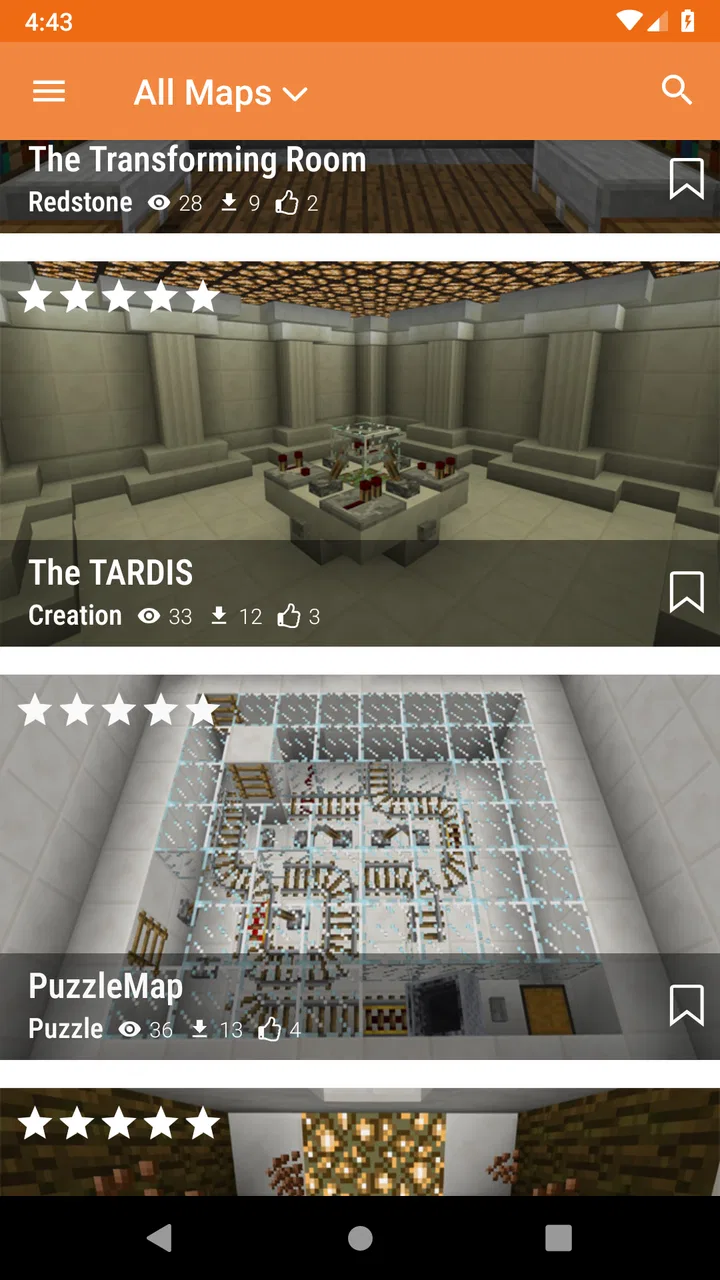
The app’s store summary describes a large collection of Minecraft PE maps with automatic installation, and that gives a good idea of its role. I approached it as a map browser first: look through the available choices, decide whether one fits the kind of session I want, and then use the installation flow rather than manually handling files. That is a sensible arrangement for mobile players, especially those who are comfortable playing Minecraft but do not enjoy managing downloads and folders.
You May Also Like

 Pandora - Music & Podcasts
Pandora’s Music Is Easy to Start, but Harder to Recover
Pandora’s strength is its low-effort path from a seed to a station. Its weak spot is how much confidence it asks you to place in connection, setup, and quiet recovery.

 AccuWeather: Weather Radar
AccuWeather Review: A Quick, Clear Forecast for Everyday Decisions
For everyday plans, the best forecast is the one you can understand quickly. AccuWeather makes rain timing, radar, and local conditions easy to act on, with a few trade-offs.

 Hill Climb Racing
Why Hill Climb Racing Still Turns Crashes Into One More Run
A tiny car, a bumpy hill and one more upgrade: Hill Climb Racing keeps resurfacing because its simple chaos makes every near-miss feel personal.

 AliExpress - Shopping App
AliExpress Makes Global Shopping Feel Personal, but Shoppers Bear the Risk
AliExpress turns a global marketplace into a pocket-sized discovery engine. Its reach is useful, its shopping loop compelling, and its trade-offs easy to miss.

 Lords Mobile: Kingdom Wars
Lords Mobile Is a Kingdom-Building Routine, Not a Quick Match
A case-by-case verdict on the building, battles, device demands, and social commitments that make Lords Mobile rewarding for some players and exhausting for others.

 PDF Scanner app - TapScanner
TapScanner Makes Paperwork Easier to Capture, Check, and Share
TapScanner makes scanning with a phone feel less like a rescue operation and more like a dependable step in getting work done. Its capture tools are useful, though not flawless.
More From Our News Desk
View All News


Its catalogue-style design is most useful when I am in the mood for a specific change of pace. A normal Minecraft world can become familiar after repeated sessions, while a downloaded map can provide a different starting point or a more directed activity. The app therefore works best as a companion for moments when I want something prepared instead of beginning another world from scratch.
I would not describe it as a deep game in its own right. The entertainment still comes from Minecraft and from the quality of the individual maps. That matters because the app can make access easier, but it cannot guarantee that every map will match my preferred playing style. A collection can be valuable even when only some entries appeal to me, though I still need to be selective rather than assuming every option will be worthwhile.
The automatic installation idea is the biggest practical advantage. On a mobile device, a map file is not always as convenient to handle as it is on a desktop computer. A dedicated app can make the process feel more direct, particularly for younger players or anyone who does not want to learn where Minecraft stores imported content. I still recommend reading the map information carefully before installing, because convenience does not remove the need to choose the right content.
What the free price means in practice
There is no purchase price to budget for the app itself: Maps for Minecraft PE is free. That makes the value question relatively simple at the starting point. I can try it without committing money, and a player who only wants occasional map ideas has little financial risk in testing whether the catalogue suits them.
Free access does not automatically make every map useful, of course. The real value depends on how often I find something I want to play and how smoothly the chosen map reaches Minecraft. If I browse frequently but rarely install anything, the app may become a source of options rather than a meaningful addition to my routine. If I regularly want fresh worlds, even a modest number of good discoveries can justify keeping it installed.
I also think it is helpful to separate the app’s free access from the value of Minecraft itself. This tool does not turn Minecraft into a free game, nor does it replace the version of Minecraft required to use the maps. The sensible way to view the price is that the map browser costs nothing to try, while the usefulness of its content depends on already having a compatible Minecraft setup.
The app is marked for Everyone, which makes its presentation approachable for a broad audience. That label is useful for families deciding whether the app is suitable to investigate, but parents should still take an interest in what a child chooses to download and play. An age label does not tell me whether every individual map will be equally appealing or appropriate for every household’s preferences.
Where the collection saves time
The clearest benefit is discovery. Instead of relying only on the worlds that appear through ordinary Minecraft play, I can use a dedicated map collection to look for a different kind of experience. That is especially handy when friends want to play something new and nobody wants to spend the whole evening searching the web for files, checking formats, and sorting out installation steps.
A realistic example is a weekend session with a younger player who wants a new Minecraft challenge but is not ready to manage downloads independently. I can browse with them, discuss which map sounds interesting, and use the app’s installation approach rather than handing them a file manager and a list of instructions. The benefit is not just speed; it also makes the process easier to supervise and easier to repeat.
Another useful situation is preparing several options before a group plays together. I can choose a few maps in advance, install them, and then let the group decide which world to open. That turns the app into a small planning tool rather than something I launch only after everyone is already waiting. It is a simple workflow, but it avoids the common problem of making a group session depend on one last-minute download.
For solo players, the collection can help break a creative rut. When I have run out of ideas for my own builds, looking at maps made around different concepts can suggest a new project or provide a ready-made place to explore. I would not expect every map to offer a long-lasting experience, but the low commitment makes experimentation reasonable.
One less obvious advantage is that automatic installation reduces the number of technical decisions between discovery and play. On a computer, manually importing a file may be manageable. On a phone, switching between a browser, downloads folder, file manager, and Minecraft can be awkward, particularly when file names are unclear. A focused installer is valuable precisely because it removes that chain of small tasks.
Limits I noticed before relying on it
The app’s convenience should not be confused with perfect compatibility. Minecraft content can depend on the edition and device environment, so I would check that a selected map is intended for the mobile version I use before treating installation as guaranteed. The app is specifically aimed at Minecraft PE maps, but that still does not mean every item will behave identically across every device or Minecraft setup.
There is also a quality trade-off built into any large map collection. A broad catalogue gives me more chances to find something interesting, but it can also mean that browsing takes time. A map may look attractive in a preview and still fail to suit my preferred way of playing. I would rather treat the app as a discovery shelf than as a carefully curated sequence where every entry deserves an immediate download.
Storage is another practical consideration. Maps are additional content, and collecting them without a plan can make it harder to remember what I have installed or which worlds I actually use. My approach would be to test one or two at a time, keep the maps that earn repeat visits, and remove the ones that were only briefly interesting. That habit preserves space and keeps Minecraft’s world list easier to manage.
The installation flow may be simpler than manual importing, but I would still pay attention to what happens after choosing a map. If Minecraft does not open automatically or the world does not appear immediately, I would avoid repeatedly tapping the install option. Instead, I would check Minecraft’s world list, confirm that the app and game are both up to date, and try again only after understanding where the process stopped. This is a small but useful troubleshooting habit for any automatic importer.
Another limitation is that the app’s value depends on the content remaining interesting to me. Players who prefer building their own survival worlds may not need a map collection very often. Likewise, someone who already has a trusted browser-based source and is comfortable handling files may find the dedicated app less necessary. The convenience is real, but it is not equally important for every Minecraft player.
How it compares with ordinary alternatives
The usual alternative is searching for maps through a web browser. That approach can expose me to more sources and may make it easier to compare descriptions, screenshots, and community discussions. It can also require more caution: I may need to identify the correct file type, avoid confusing downloads, and import the result manually. Maps for Minecraft PE is more focused and potentially easier for a quick install, while browser searching can offer broader research.
Manual file management has one clear advantage: control. I can decide exactly where files go, keep backups, rename them, and organize them in my own way. For experienced users, that control may matter more than a simplified installation path. The trade-off is that manual handling creates more opportunities for confusion, especially when a player is using a phone and does not regularly work with downloaded files.
Another alternative is simply using Minecraft’s existing worlds and community activity without a separate map app. That is the cleanest option for someone satisfied with personal survival, creative building, or multiplayer servers. In that case, adding a map catalogue may create another layer to browse without solving a real problem. I would only recommend installing this app when the desire for ready-made maps is genuine.
I also see a difference between this tool and a general-purpose Minecraft companion app. A broad companion may include guides, skins, seeds, or other extras, while this one is more directly concerned with maps. That narrower purpose can be a strength when I know what I want. It can be a weakness if I am looking for a complete Minecraft resource hub rather than a map-focused catalogue.
Who will get the most from it
I think the strongest audience is mobile Minecraft players who enjoy trying prepared worlds and want a less technical route to installation. It is also a reasonable choice for families, younger players, and casual groups that need a quick source of new map ideas. Because the app is free, trying it does not require a financial decision, which makes it easier to evaluate based on actual use rather than promises.
It can also suit a player who hosts informal sessions with friends. Preparing maps ahead of time gives the group a menu of possibilities and reduces the chance that everyone will spend the first part of the session searching separately. The best workflow is to install content before the planned game, verify that it appears in Minecraft, and then avoid making the whole group wait while troubleshooting begins.
I would be more cautious about recommending it to advanced users who already maintain a personal library of maps. If someone is comfortable with manual imports, backups, and file organization, the app may not save enough time to justify another tool. The same applies to players who rarely leave their main survival world; for them, the catalogue could remain unused after the initial curiosity.
It is also not the right choice for someone expecting the app itself to provide a complete game or guarantee premium-quality experiences. The app is a doorway to maps, not a substitute for Minecraft and not a promise that every downloaded world will become a long-term favorite. That distinction is important for setting expectations before installation.
Compatibility, version, and everyday setup
The current version is 2.3.3, and the app requires Android 6.0 or later. That makes the operating-system requirement worth checking before installing, particularly on an older phone or tablet. A compatible Android version does not by itself guarantee that every map will work perfectly, so I would still treat each installation as a small test rather than assuming universal behavior.
The app was released on September 7, 2017, and it has had time to become a familiar option in its niche. Its average rating is 4.3 from around nineteen thousand ratings, with over one million installs and roughly two hundred fifty reviews. Those figures suggest that many people have found the concept useful, but they should be read as context rather than as a guarantee that the app matches my exact Minecraft version, device, or taste in maps.
My recommended setup is simple. I would first confirm that Minecraft is installed and ready, then browse for one map that matches a specific goal instead of downloading several at once. After installation, I would open Minecraft and check the world list. If the map is not immediately visible, I would restart the game before assuming the import failed. Once I know the workflow works on my device, adding more maps becomes much less frustrating.
A second practical tip is to decide what kind of session I want before browsing. “Something new” is too vague and can lead to endless scrolling. A clearer target, such as a short exploration session, a group challenge, or inspiration for a build, makes it easier to reject maps that look interesting but do not fit the moment. This is where the app works best: not as an endless feed, but as a tool for choosing the next Minecraft activity.
My final recommendation
After using it as a map-discovery and installation companion, I see Maps for Minecraft PE as a useful free option for the right player. Its strongest point is practical: it brings map browsing and automatic installation into one focused place, reducing the awkward file-handling steps that can make mobile Minecraft content feel harder to use than it should.
I would recommend trying it if you play Minecraft on Android, want ready-made worlds, and prefer a guided route over manual downloads. I would be especially likely to suggest it to a casual player or a family preparing a shared session. The fact that it is free means the sensible test is to install it, try a small number of maps, and judge whether the catalogue actually improves your playtime.
I would skip it if I am happy with my existing worlds, need extensive control over files, or expect every map to be polished and perfectly compatible. In those cases, Minecraft alone or a carefully chosen browser-based source may be a better fit. My verdict is therefore positive but specific: the app earns its place when convenience and fresh map ideas matter more than advanced library management.
For me, that is a fair exchange. It does not transform Minecraft, and it cannot replace personal judgement when selecting content, but it makes a common mobile task easier. If the goal is to find another world without turning installation into a technical project, this focused tool is worth a try.
FAQs for Maps for Minecraft PE
01What is Maps for Minecraft PE, and how does it enhance gameplay?
Maps for Minecraft PE is an app that provides a wide variety of custom maps for Minecraft Pocket Edition. It enhances gameplay by offering unique worlds, challenges, and adventures designed by other players. This allows users to explore new environments and scenarios, adding variety and excitement to their Minecraft experience.
02Is Maps for Minecraft PE free to download and use?
Maps for Minecraft PE is free to download, but it may offer in-app purchases for additional features or premium maps. While the base app provides many free maps, users might need to pay for exclusive content or to remove ads. Always check the app’s description for details on costs before downloading.
03How do I install a map from the app into my Minecraft game?
Installing a map from Maps for Minecraft PE is a straightforward process. Once you select a map within the app, you can usually tap a download or install button. The app will automatically integrate the map into your Minecraft PE directory, allowing you to access it in-game without manually moving files.
04Are the maps compatible with all versions of Minecraft PE?
Most maps provided by Maps for Minecraft PE are compatible with recent versions of the game, but there can be exceptions. It’s essential to check the map’s description for version compatibility to ensure it works with your current Minecraft PE version. Updates may be needed if compatibility issues arise.
05Can I create and share my own maps using Maps for Minecraft PE?
Maps for Minecraft PE primarily functions as a platform for downloading maps, but it may not include tools for creating or uploading your own. Typically, players use separate tools or the game itself to design maps. If sharing is a feature, instructions will be provided within the app or its community guidelines.
Pros
- Extensive map variety enhances gameplay.
- Simple installation for quick access.
- Regular updates with new content.
- Compatible with most Minecraft PE versions.
- User-friendly interface for easy navigation.
Cons
- Some maps may contain bugs or glitches.
- Occasional ads can interrupt gameplay.
- Requires internet for initial downloads.
- Limited customization options for maps.
- In-app purchases may be necessary.

Maps for Minecraft PE
Gallery